Automation Platform
Automation Platform overview
# Automation Platform overview [Warp Factories](/factories/) and [standalone cloud agents](/platform/) run on the Automation Platform. It provides the execution, configuration, and APIs they share. For a team workflow that takes issues through planning, implementation, and review, start with the [Warp Factories quickstart](/factories/quickstart/) in the <a href=https://platform.warp.dev>Warp Factories web app</a>. For a single run in Warp, use the [cloud agents quickstart](/platform/quickstart/). See [transitioning from Oz](/platform/transitioning-from-oz/) if you already use the legacy web app, CLI, or SDKs. ## How a run works A run starts with a request or event and ends with a result you can inspect: 1. A **trigger** fires: a schedule, an integration event like a Slack mention or a CI failure, an API call, or a manual start. 2. The agent receives the request and its context, such as a Slack thread, PR metadata, or CI logs. 3. The agent executes on a **host**, optionally inside an [environment](/platform/environments/) that defines its image, repos, and setup. 4. The run produces **outputs**: a pull request, a Slack reply, a report, or a transcript and summary.  ## Integrations and triggers [Factory automations](/factories/automations/) route events and schedules to factory agents. Connect the [tools your team uses](/factories/connect-your-factory/), or use [webhooks](/factories/webhooks/) and [factory endpoints](/factories/factory-api/) for custom intake. Standalone agents also have [integrations](/platform/integrations/) and [scheduled runs](/platform/triggers/scheduled-agents/). For CLI setup, use `oz integration create` on the Oz CLI; see the [integration setup guide](/agents/cli/oz-cli/integration-setup/). ## Inspecting results Runs retain their status, transcript, and outputs for later review. For inspection, sharing, and steering, see [viewing cloud agent runs](/platform/viewing-cloud-agent-runs/). Factory work and standalone work have different inspection paths; the [cloud agents overview](/platform/#monitor-inspect-and-share-cloud-agent-runs) links to each. To fan work out across parent and child agents, see [multi-agent orchestration](/platform/orchestration/). ## Environments An [environment](/platform/environments/) defines a Docker image with your toolchain, repositories, and setup commands. Use the [environment setup reference](/platform/environments/configuring-environments/) for standalone runs and [factory runners](/factories/runners/) for factory execution. ## Hosts A host is where the agent executes. By default runs execute on [Warp-hosted infrastructure](/factories/warp-hosting/), with nothing to set up. On Enterprise plans, [self-hosted runners](/factories/self-hosting/) keep code and execution inside your own network while Warp still tracks the runs. ## The CLI Use the [Oz CLI](/agents/cli/oz-cli/) for `oz` workflows in CI, scripts, and remote servers. The separate [Warp Agent CLI](/agents/cli/) runs the Warp Agent with `warp`. Consult each command reference rather than treating the binaries as interchangeable. ## API and SDKs Use the [Warp Platform API and SDKs](/factories/developer-tools/) to send work from your own services. [Factory endpoints](/factories/factory-api/) dispatch by factory UID; [agent and run endpoints](/factories/api-and-sdk/) start standalone runs and inspect, continue, or cancel runs. The official [`warp-platform-sdk` Python package](https://pypi.org/project/warp-platform-sdk/) and [`@warp-dot-dev/warp-platform-sdk` TypeScript package](https://www.npmjs.com/package/@warp-dot-dev/warp-platform-sdk) provide typed requests, retries, and error handling. ## Secrets Agents often need credentials for APIs, cloud providers, databases, and MCP servers. Store them as [secrets](/platform/secrets/), and Warp injects them at runtime without exposing the values in logs or the UI. Secrets can be scoped to the whole team or to one person. ## Shared configuration For factories, declare shared [skills](/factories/factory-skills/), MCP servers, and execution defaults in the [factory definition](/factories/factory-as-code/). Standalone workflows also use [MCP servers](/platform/mcp/), [rules](/agents/capabilities/rules/), [saved prompts](/knowledge-and-collaboration/warp-drive/prompts/), and [environment variables](/knowledge-and-collaboration/warp-drive/environment-variables/); follow each reference for its scope and setup. ## Measuring factory work Use [Scorers](/factories/measure-and-improve/scorers/), [benchmarks](/factories/benchmarks/), and [Self-improvement](/factories/measure-and-improve/self-improvement/) to evaluate factory work and propose changes to its configuration. See [measure and improve](/factories/measure-and-improve/) for metric definitions and limitations. ## Related pages * [Warp Factories quickstart](/factories/quickstart/) - Create a factory and send its first work item. * [Architecture](/platform/architecture/) - reference diagrams of the stack, the run lifecycle, and data boundaries. * [Cloud agents](/platform/) - what cloud agents are, how they get triggered, and how to run them with or without the Warp app. * [Cloud agents quickstart](/platform/quickstart/) - run your first cloud agent in about ten minutes. * [Environments](/platform/environments/) - define the toolchain and repos a run executes against. * [Warp Platform API](/factories/api-and-sdk/) - drive the platform programmatically.Tell me about this feature: https://docs.warp.dev/platform/overview/The Automation Platform provides shared execution, configuration, and APIs for Warp Factories and standalone cloud agents.
Warp Factories and standalone cloud agents run on the Automation Platform. It provides the execution, configuration, and APIs they share.
For a team workflow that takes issues through planning, implementation, and review, start with the Warp Factories quickstart in the Warp Factories web app. For a single run in Warp, use the cloud agents quickstart. See transitioning from Oz if you already use the legacy web app, CLI, or SDKs.
How a run works
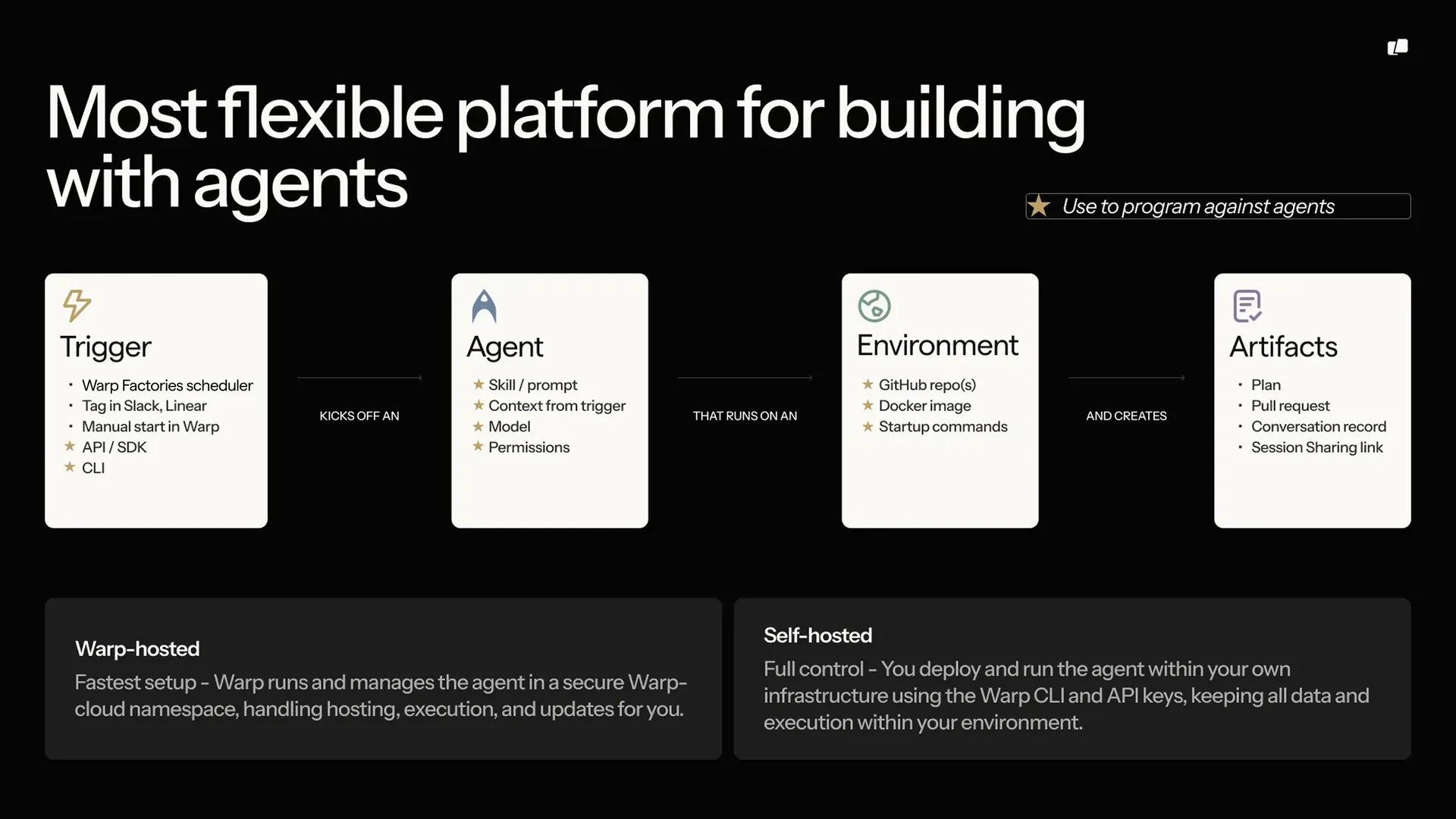
Section titled “How a run works”A run starts with a request or event and ends with a result you can inspect:
- A trigger fires: a schedule, an integration event like a Slack mention or a CI failure, an API call, or a manual start.
- The agent receives the request and its context, such as a Slack thread, PR metadata, or CI logs.
- The agent executes on a host, optionally inside an environment that defines its image, repos, and setup.
- The run produces outputs: a pull request, a Slack reply, a report, or a transcript and summary.
Integrations and triggers
Section titled “Integrations and triggers”Factory automations route events and schedules to factory agents. Connect the tools your team uses, or use webhooks and factory endpoints for custom intake.
Standalone agents also have integrations and scheduled runs. For CLI setup, use oz integration create on the Oz CLI; see the integration setup guide.
Inspecting results
Section titled “Inspecting results”Runs retain their status, transcript, and outputs for later review. For inspection, sharing, and steering, see viewing cloud agent runs. Factory work and standalone work have different inspection paths; the cloud agents overview links to each.
To fan work out across parent and child agents, see multi-agent orchestration.
Environments
Section titled “Environments”An environment defines a Docker image with your toolchain, repositories, and setup commands. Use the environment setup reference for standalone runs and factory runners for factory execution.
A host is where the agent executes. By default runs execute on Warp-hosted infrastructure, with nothing to set up. On Enterprise plans, self-hosted runners keep code and execution inside your own network while Warp still tracks the runs.
The CLI
Section titled “The CLI”Use the Oz CLI for oz workflows in CI, scripts, and remote servers. The separate Warp Agent CLI runs the Warp Agent with warp. Consult each command reference rather than treating the binaries as interchangeable.
API and SDKs
Section titled “API and SDKs”Use the Warp Platform API and SDKs to send work from your own services. Factory endpoints dispatch by factory UID; agent and run endpoints start standalone runs and inspect, continue, or cancel runs.
The official warp-platform-sdk Python package and @warp-dot-dev/warp-platform-sdk TypeScript package provide typed requests, retries, and error handling.
Secrets
Section titled “Secrets”Agents often need credentials for APIs, cloud providers, databases, and MCP servers. Store them as secrets, and Warp injects them at runtime without exposing the values in logs or the UI. Secrets can be scoped to the whole team or to one person.
Shared configuration
Section titled “Shared configuration”For factories, declare shared skills, MCP servers, and execution defaults in the factory definition. Standalone workflows also use MCP servers, rules, saved prompts, and environment variables; follow each reference for its scope and setup.
Measuring factory work
Section titled “Measuring factory work”Use Scorers, benchmarks, and Self-improvement to evaluate factory work and propose changes to its configuration. See measure and improve for metric definitions and limitations.
Related pages
Section titled “Related pages”- Warp Factories quickstart - Create a factory and send its first work item.
- Architecture - reference diagrams of the stack, the run lifecycle, and data boundaries.
- Cloud agents - what cloud agents are, how they get triggered, and how to run them with or without the Warp app.
- Cloud agents quickstart - run your first cloud agent in about ten minutes.
- Environments - define the toolchain and repos a run executes against.
- Warp Platform API - drive the platform programmatically.